UX Case Study
St. Jude
Fit Day
St. Jude's internal check-in tool used by staff and volunteers at the Memphis Marathon and Rock 'n' Roll Running Series events nationwide. It managed bib pulls, track runner incentives, and process thousands of St. Jude Heroes across expo hours.
Overview
Project Overview
The Short Version
Race-day check-in was breaking at the booth: pulled bibs weren't flagged, volunteers guessed, and lines grew. I redesigned Fit Day around three decisions: flag pulled bibs automatically at upload, turn incentive handouts into a per-runner checklist, and make every participant list filterable. The redesign served 22,500+ runners at events nationwide.
The Problem
The existing check-in software made it nearly impossible for volunteers and employees to quickly identify pulled bibs, know what items each runner should receive, or track overall event progress, creating long lines and frustrated runners on race day.
Business Goals
User Goals
My Role
I led the redesign end-to-end, from research through shipping. Rather than interview users in a conference room, I worked these events firsthand, staffing the booth and checking in runners myself, while also observing where volunteers got stuck and interviewing territory staff before and after expo hours. Doing the work myself, across both the Memphis Marathon and Rock 'n' Roll Running Series, is what made the friction undeniable.
Working Across the Org
Volunteers & booth staff
Worked check-in beside them at the Memphis Marathon and Rock 'n' Roll events, so the design answered problems I hit myself.
Territory staff
Interviewed before and after expo hours to separate one-event quirks from patterns worth building for.
Engineering
Designed within existing component libraries so every feature was defensible in development cost and shipped fast.
Event organizers
Aligned the bib pull process across two different event models, St. Jude's own marathon and a third-party race series.
Design Constraints
This was an internal tool built for speed. The engineering team needed to ship quickly, and the product had to stay simple and maintainable, which meant the design had to work within existing component libraries and avoid anything that would require heavy custom development. There was no room for elaborate UI patterns or experimental interactions.
That constraint shaped every decision: layouts needed to be clean and scannable without relying on visual complexity, and any new UI element had to earn its place by solving a clear problem rather than adding polish. Getting new design elements adopted inside a large organization is genuinely difficult: teams move fast, standards are locked, and anything unfamiliar adds friction for developers and product owners alike.
Speed over polish
Engineering needed to move fast. Every design decision had to be defensible in terms of development cost. No speculative complexity.
Standard components only
The team worked within existing UI libraries. Custom components had to have a strong functional justification to make it past review.
Clarity over style
Volunteers and employees use this tool under pressure, in noisy expo environments, often for the first time. Intuitive and scannable beat visually ambitious every time.
How the Marathon Works
Fit Day was used across two distinct events. The St. Jude Memphis Marathon® Weekend is St. Jude's own flagship event. All runners are required to fundraise. The Rock 'n' Roll Running Series is a third-party race series where St. Jude is a charity partner; runners there choose to either pay a registration fee or fundraise instead.
In both cases, runners commit to raising a minimum amount before race day. If they fall short, they're responsible for the difference. At Rock 'n' Roll events, runners who don't meet their commitment have their bib pulled from the standard check-in and are redirected to the St. Jude booth at the expo. At the Memphis Marathon, all runners check in at one place, pulled bibs are held in a separate box so the check-in volunteer knows to look into why that runner's bib was flagged. Either way, depending on how much they raise, runners earn different incentive levels (Bronze, Silver, Gold, Platinum), each with different perks and swag.
The Challenge
What Wasn't Working
The Bib Pull Problem
When a runner chose to fundraise instead of paying a registration fee, they committed to raising a minimum amount. If they didn't hit that goal before the event, Rock 'n' Roll pulled their bib from the standard check-in process. Those runners were redirected to the St. Jude booth at the expo to retrieve it.
The problem: the old software had no way to flag that a bib had been pulled. When a confused runner arrived at the booth, volunteers had to look them up, make an educated guess about why the bib was pulled, and then physically search through a box of bibs sorted by number , a number that didn't always appear clearly on the profile because it had to be uploaded through a separate platform.
The cascade of confusion:
The Old Profile
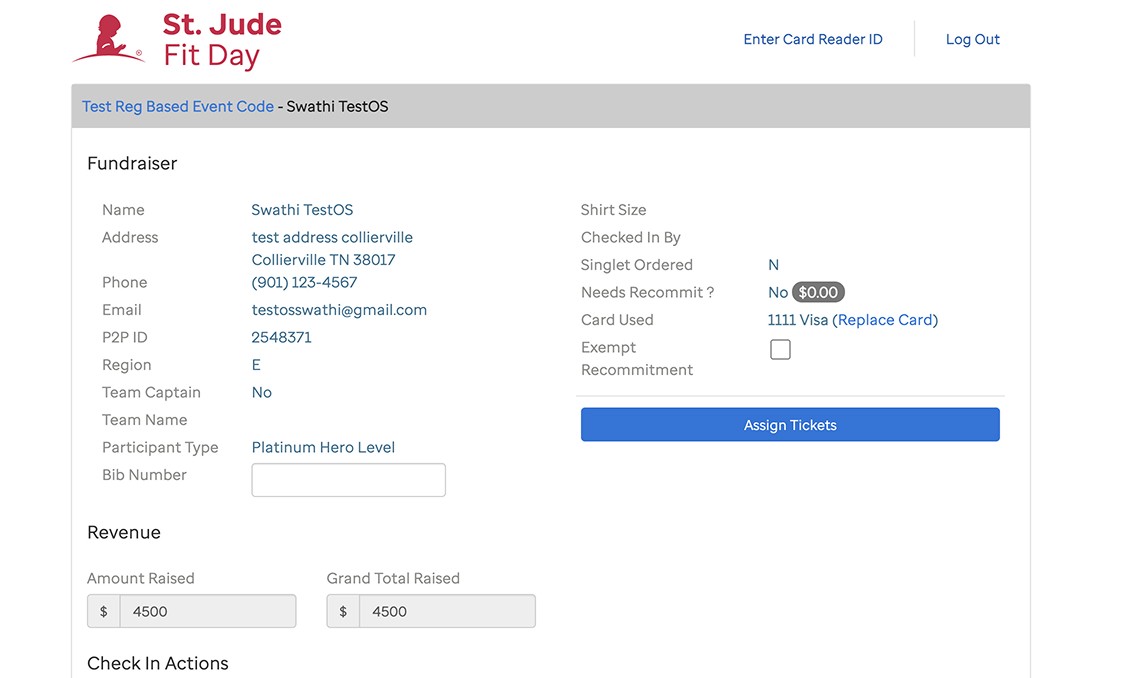
The original profile showed participant data but gave no clear indication of pulled bibs, and the layout made it hard to scan quickly under pressure.
The Profile Clarity Problem
The old profile was hard to scan. Volunteers couldn't quickly determine what items a runner should receive, different fundraising levels earned different incentives, and there was no structured way to know what had or hadn't been handed out. Tech Shirts and Singlets in particular were a constant source of friction: volunteers had no way to record whether a shirt had been given, what type it was, or what size, leaving inventory planning as guesswork for organizers year after year.
No incentive tracking
Volunteers had to mentally cross-reference what each participation level was entitled to. This information wasn't surfaced on screen.
No t-shirt record
There was no way to log whether a runner received a Tech Shirt or Singlet, or what size, making year-over-year inventory planning impossible.
Hard to scan under pressure
With lines forming during expo hours, a dense unstructured layout slowed every interaction at the busiest moments.
Solution
What We Built
Bulk Bib Pull Upload
Admins can now upload an Excel file of all pulled bibs (with names and numbers) directly into the system. The profiles of affected runners are automatically flagged with a 'Not Met – Bib Pulled' badge on their commitment field, so volunteers know immediately why the runner is at the booth and where their bib is.
Check-In Checklist
A structured checklist on each participant profile tells volunteers exactly what items to hand out based on the runner's fundraising level. Volunteers check off each item, including shirt type (Tech Shirt or Singlet) and size, creating an auditable record per runner and giving organizers real data for future inventory planning.
Rainbow Progress Bar
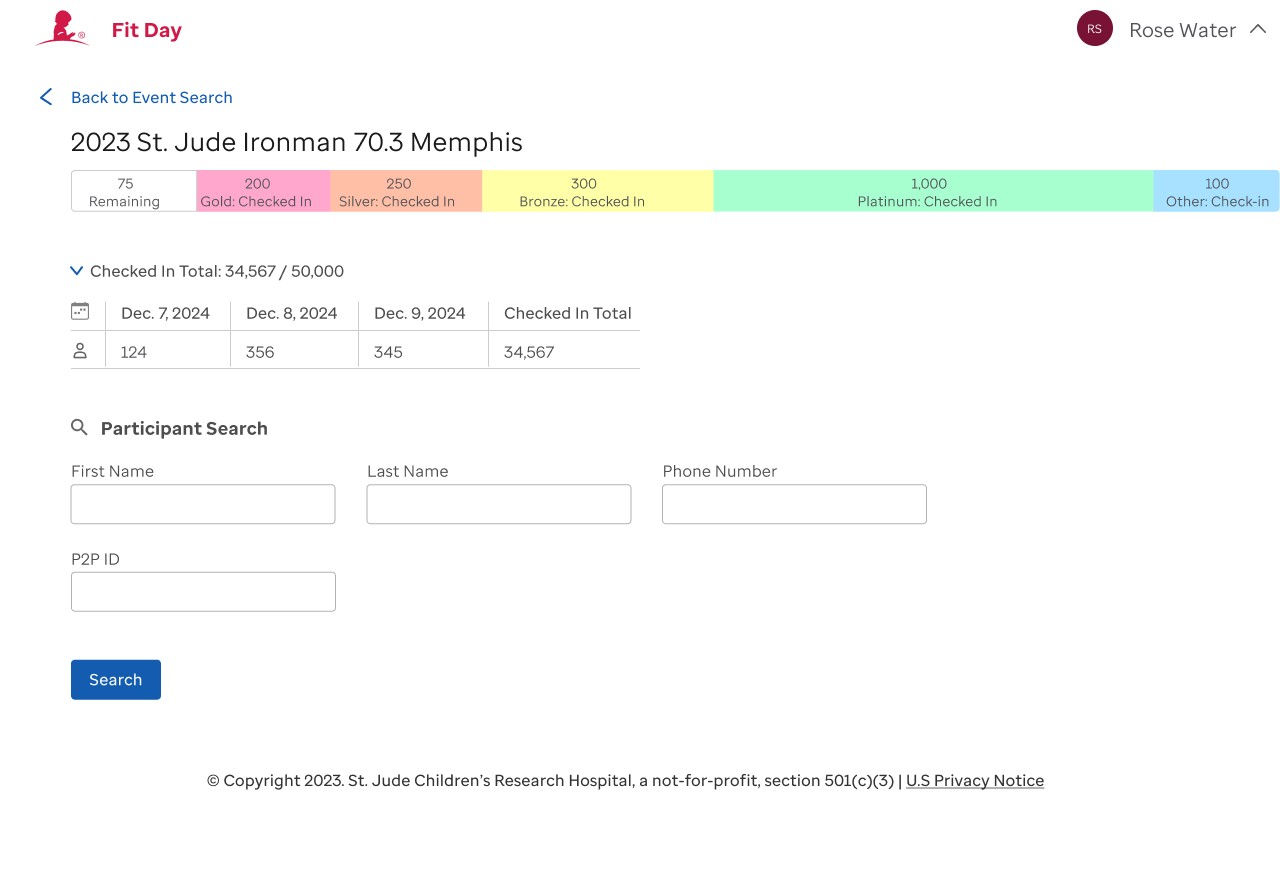
A color-coded bar at the top of the event dashboard shows how many runners from each fundraising level have checked in. Gold, Silver, Bronze, Platinum, and Other are each displayed with their live counts, giving territory leads an at-a-glance picture of event progress across all levels.
Advanced Participant Filtering
The participant list gained filters for Participation Type, Checked In status, and Bib Pulled status. Volunteers can now instantly surface who still needs to pick up their bib, or pull a list of everyone in a specific fundraising tier, dramatically reducing search time at the booth.
Check-In Counter
A live counter at the top of each event shows total checked-in vs. registered participants, keeping staff informed of how many people are still expected throughout expo hours without needing a separate report or spreadsheet.
Exemption Notes (Role-Restricted)
When a runner has a legitimate reason for not meeting their fundraising goal (financial hardship, personal circumstances), staff can add an exemption note directly on the profile. The note is hidden from lower-access roles, keeping sensitive information visible only to those who need it.
Rainbow Bar: Live Example
The bar shows remaining participants in gray, with each fundraising tier in its own color. Territory leads can see at a glance which levels are still largely un-checked-in and where to focus attention.
Designed Under Constraints, Adopted Org-Wide
The rainbow bar started here and is now used across multiple applications in the organization.
Building a new design element that gets adopted at scale inside a large organization is genuinely rare. The bar was designed within tight constraints: standard components, fast delivery, but it solved a visualization problem clearly enough that other teams picked it up independently.
Design
The Screens
Bib Pull Management
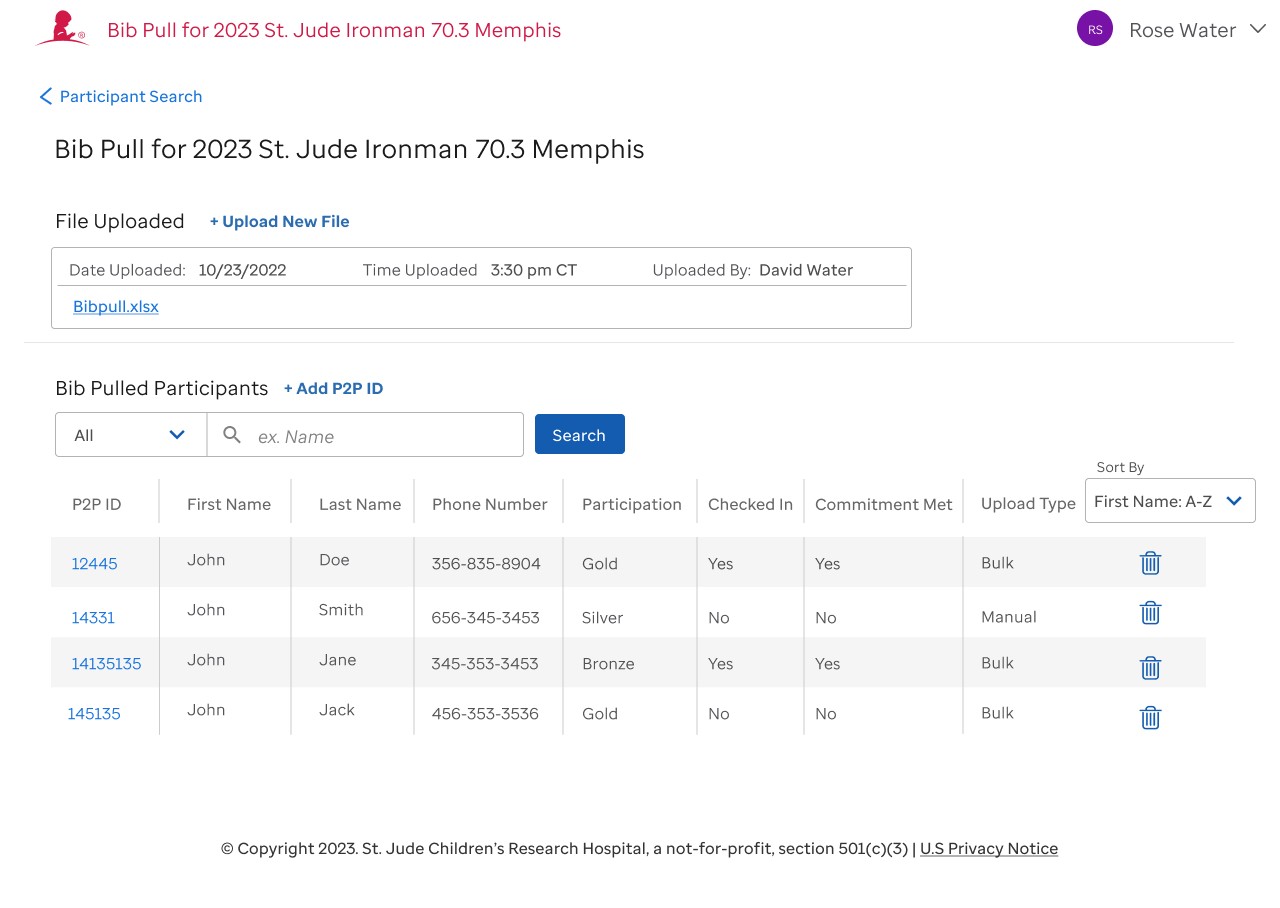
The bib pull screen allows admins to upload a bulk Excel file of all runners whose bibs were pulled. Once uploaded, the system logs the date, time, and uploader, and creates a searchable table of affected participants.
Each entry shows P2P ID, name, phone, participation level, check-in status, commitment status, and upload type (Bulk or Manual). Admins can also add individual P2P IDs manually for edge cases.
Event Dashboard & Participant Search
The event view surfaces everything a territory lead needs at the top: location, date, time, event code, and the live check-in counter. Below that, the rainbow bar shows checked-in counts by level.
The participant search lets volunteers look up by first name, last name, phone number, P2P ID, or email. Below the search, filter dropdowns let staff narrow the list by participation type, check-in status, or bib pull status, surfacing exactly who they need in seconds.
Filtering in practice
Setting "Checked In: No" + "Bib Pulled: Yes" instantly shows every runner who still needs to collect a pulled bib, a list that used to require manually scanning a physical box with no digital equivalent.
Redesigned Participant Profile
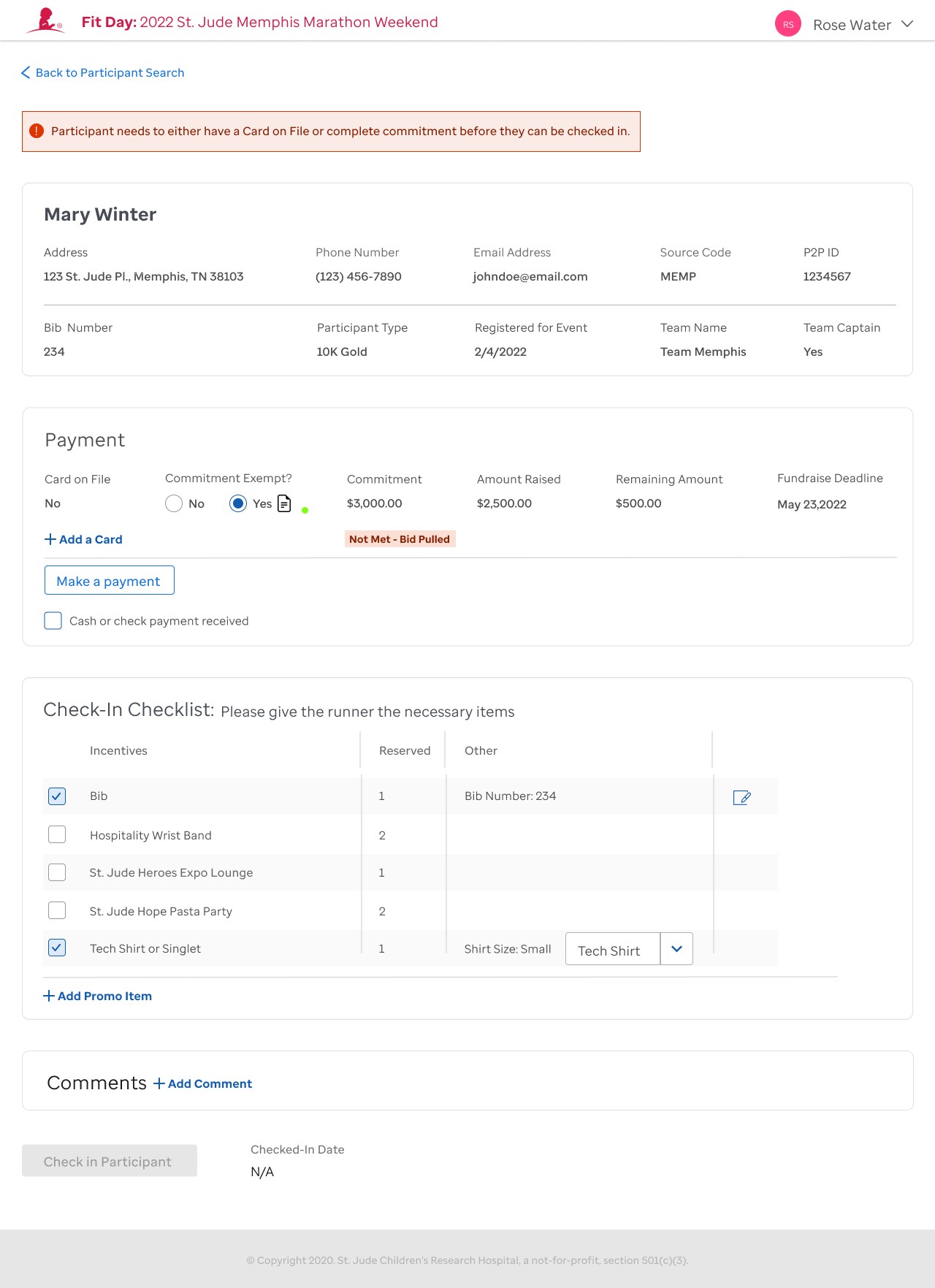
The new profile gives volunteers everything they need in a scannable layout. The participant's name and check-in status are prominent at the top. Contact details, P2P ID, participation type, and team info are organized in a clean grid.
The Payment section clearly shows whether a runner's commitment was met, and when a bib was pulled, it appears as a red "Not Met – Bib Pulled" badge directly on that field. No guessing required.
Top-of-page alert: 'Participant needs a Card on File or complete commitment'
Red indicator on the commitment field, visible immediately on load
Structured list of items to hand to the runner, with checkboxes and shirt size dropdown
Free-form note field for any additional context, saved per participant
Check-In Checklist
Volunteers check off Bib and Tech Shirt / Singlet as they hand them out. Shirt type and size are recorded via dropdown, giving organizers real data for next year's orders.
Exemption Note
When a runner has a legitimate reason for not meeting their goal, staff can mark them as exempt and leave a note. The note is visible only to roles with the right access level.
What We Heard in the Field
I didn't just observe. I worked the expos myself, checking in runners at the St. Jude booth alongside volunteers and staff. That put me directly in the friction: handling bib pulls, fielding confused runners, and feeling the pressure of a line forming in real time.
I also interviewed territory staff and volunteers who worked these events regularly. Their perspective across multiple marathons surfaced patterns I wouldn't have caught in a single event, and shaped every feature.
Volunteers
"When a runner walks up and I pull up their profile, it's hard to tell at a glance why their bib was pulled, and it's not always clear what items I'm supposed to hand them either."
Territory Leads
"We never know how many Tech Shirts versus Singlets to order. We have no idea how many of each we actually handed out."
Event Staff
"If someone has a personal reason for not meeting their goal, that's not information I want visible to everyone standing in line behind them."
Outcomes
What We Delivered
The redesigned Fit Day software shipped and was used at St. Jude marathon events across the country. The changes reduced friction at the booth, gave volunteers and employees confidence in their check-in decisions, and created a data trail that didn't exist before.
Impact Summary
See It in Action
A walkthrough of the redesigned check-in flow captured during QA testing, from participant search through checklist completion.
Next Steps
What's Next
Key Takeaway
"The best research happened on race day, not in a meeting room."
Working the events firsthand meant I saw exactly where the process broke down: the moment a confused runner walked up, the scramble through a physical box, the volunteer's apologetic shrug. That experience made the design decisions obvious in a way no stakeholder interview could have. Fit Day is why I still push to work the process myself before I design for it.
Build post-event reports that aggregate shirt types and sizes given across all participants, giving organizers exportable data on Tech Shirt vs. Singlet counts for next year's orders without manual counting.
Expand the exemption note system to support role-based visibility tiers, so different levels of staff see different levels of detail without a shared credential workaround.
Add a runner-facing notification or confirmation mechanism so participants whose bibs are pulled receive advance notice before arriving at the event, reducing confusion at the booth.
Explore a mobile-first redesign of the check-in flow for volunteers working with tablets or phones during high-volume events.
Introduce a post-event feedback loop: a lightweight survey for volunteers and territory leads after each event to surface emerging friction points and inform the next design iteration.